Welcome! We are Team Gappmakers and this is our fourth blog. After having a very long schedules and meetups here we finally seems to be finalized in our app development. Here we are going to discuss moreover about the Implementation and UI design of our Mindpeace app. In this blog we would also discuss about the coding conventions used in our coding, we had done 2 case studies by implementing the app for the user and understanding the real situation.
Overview
We will be elaborating on following points in our blog:
- Coding Conventions
- Context of Use
- Storyboard
- Design Solution
- Summary of Changes
- Upcoming Blog
A good coding convention make works a lot easier for developers. It significantly reduces time and effort to read and understand source code. It simply helps us to be more focussed on code rather than arguing on syntax and style preferences.
Hence to avoid such conflicts in future, in the beginning of the project we have defined certain points to be followed.

Class names will be nouns, in mixed case with the first letter of each internal word capitalized. Class names will be kept simple and descriptive. Whole words will be used and acronyms and abbreviations will be avoided (unless the abbreviation is much more widely used than the long form, such as URL or HTML).
e.g. class Raster; class ImageSprite; etc.
Interface names will be capitalized like class names.
e.g. RasterDelegate, Storing etc.
Methods will be verbs, in mixed case with the first letter lowercase, with the first letter of each internal word capitalized
e.g. run(), runFast(), getBackground() etc
Except for variables, all instance, class, and class constants are in mixed case with first letter as lowercase. Internal words start with capital letters. Variable names will not start with underscore _ or dollar sign $ characters, even though both are allowed.
Variable names will be short yet meaningful. The choice of a variable name will be mnemonic- that is, designed to indicate to the casual observer the intent of its use. One-character variable names will be avoided except for temporary “throwaway” variables. Common names for temporary variables are i, j, k, m, and n for integers; c, d, and e for characters. e.g.int i; char c; float myWidth; etc.
Constants name
The names of variables declared class constants and of ANSI constants will be all uppercase with words separated by underscores (“_”). (ANSI constants will be avoided, for ease of debugging.)
e.g. CONSTANT, MAX_PRIORITY, MAX_DISTANCE etc.
File Import
While importing a file, the import statement will have the complete file name prefixed by its package name.
Example : import android.app.Dialog
The Block commenting helps us in making descriptive comment about particular things, and single line comments for small minute details.
Example:
/*
- Description */
Example:
columns, //columns to return null, //columns for the WHERE clause
Context of Use
Mindpeace is a real need of the hour for many of us. We all get worried sometimes when our beloved are not in contact for certain amount of time. Hence to understand the situation more better we are going to explain the user stories as BEFO as 1st user and FOLLO as the 2nd user. Here, below are the persona of these awesome cool characters.

Name : Amy
Profession : Forest officer
Demographics : Working in jungles for animal protection
Age: 26 years
Daily Schedule: Amy is very sincere and very enthusiastic person. He goes to work to a very remote place which is termed very risky by his mother. Hence his mother always wants to be informed about his whereabout while he is travelling to his work.
FOLLO AMY MOTHER

Name : Amy Mother
Profession : Housewife
Demographics : Staying at home
Age: 48 years
Daily Schedule: Amy’s Mother is a regular housewife who spends most of her time at home. Her son recently joined forest security force and she stays away from him. At the end of the day she wants to know that her son has reached to work and home safely or not.
Design Solution with AMY
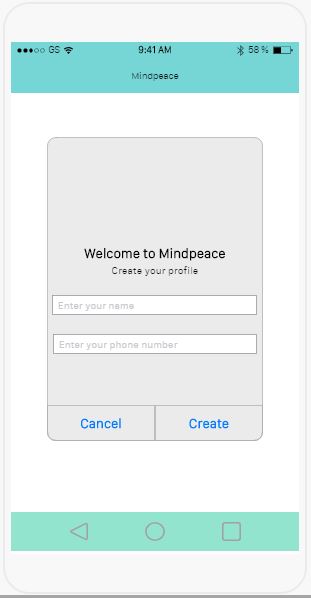
AMY has downloaded our app. The first page is the below page as shown which asks for his name and mobile number.
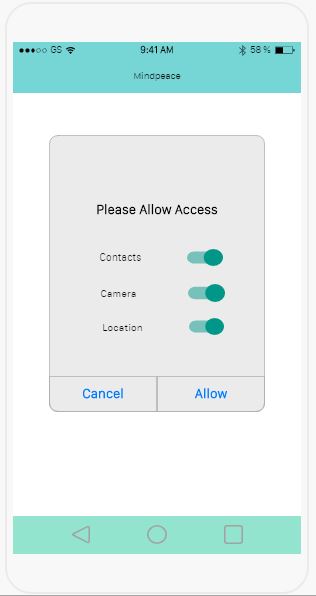
After entering the details, he is being asked to allow for certain permissions in order to allow restrictionless execution of the application.
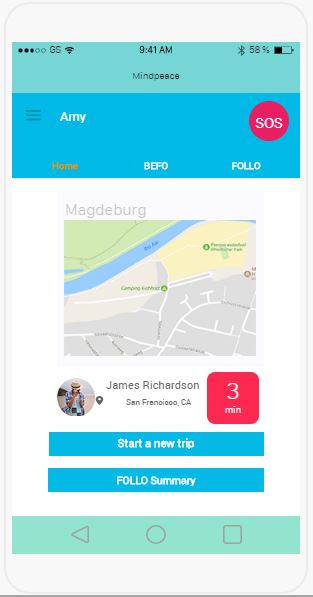
Then Amy is navigated to home page where he can see the dashboard. Within dashboard there are various information available in summary, like user location, estimated time of arrival. Also he is able to see option to directly create new trip below the dashboard widget.
As being far from her mother, Amy thinks to test our application by creating his first follow request.
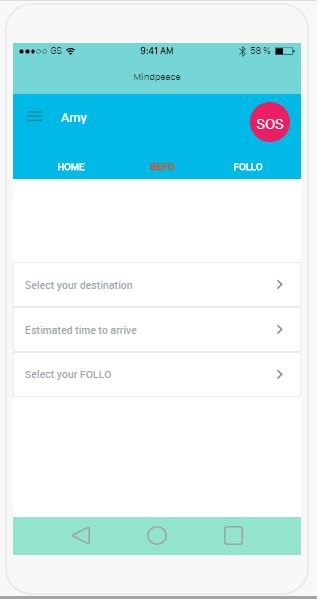
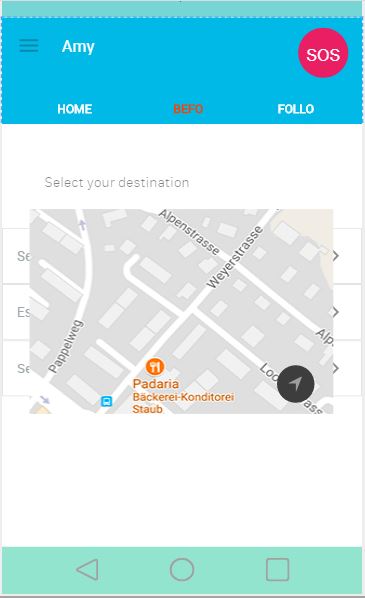
To start a new trip request he first needs to select his current location in the map.
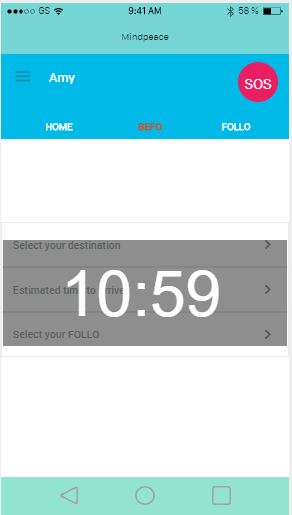
Then he needs to add the approximate time of arrival.
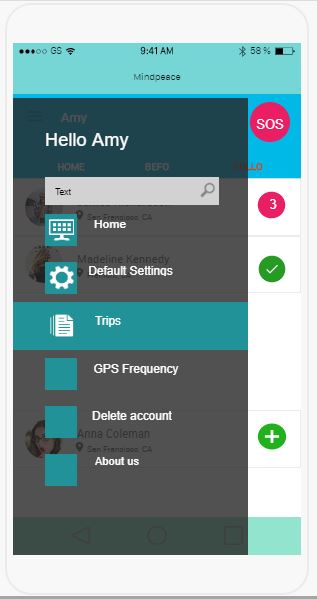
He can also browse application and look into the drawer function in the app for further customization of application.
While her mother recieves a notification in her phone and then she is redirected into follo page.
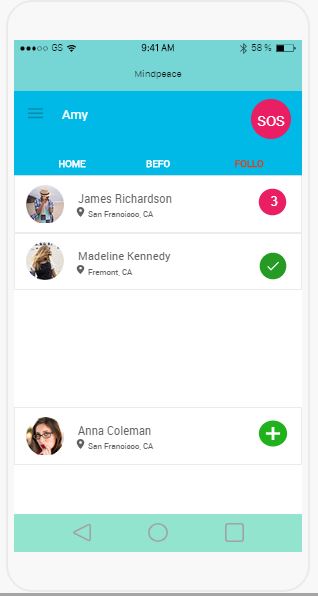
As the trip ends, in this page she can update herself with a small green tick appears.
User interface is really important for developers, hence we had understood this responsibility very well. From start our teams always has focucced to make a balance between making an efficient design for customer and us. We have used dashboard so that user perform the basic task from homescreen itself. Keeping safety a major concern for us, we have kept the sos button in common of dashboard.
We have made some changes in the design of the app to make it more pleaseant. We have also made changes in the user registration method. previously we were not taking regitration from user but now we are going to ask for registration and permissions.
We also have our new logo for the application, which is different from the Team logo.

We are currently busy in UI development and we are constantly working to make a efficient application which meets the user demand satisfactorally. Further to that we will be testing the app in real-time environment. We will update you about the further steps being taken by our team in next Blog.
We thank you so much for your read and support.
Please stay tuned for our upcoming blogs.
-Team G-APPMAKERS