System Design
welcome to our third blog post in this blog post we would like to share our development phase of system design
The system design is the core for development of the app. we are going to demonstrate the interation of the app and the user with the help UML diagrams of State chart and sequence diagram and then we would like to explain in detail with the class diagram about al1 the classes and other attributes involved in the app and the association of classes to each other
Behavioral Diagram
With the help of the state chart diagram we can show the flow of information from one state to another.
State chart for entering new activity
In the below diagram it shows the simple operation of entering a new activity in our application.
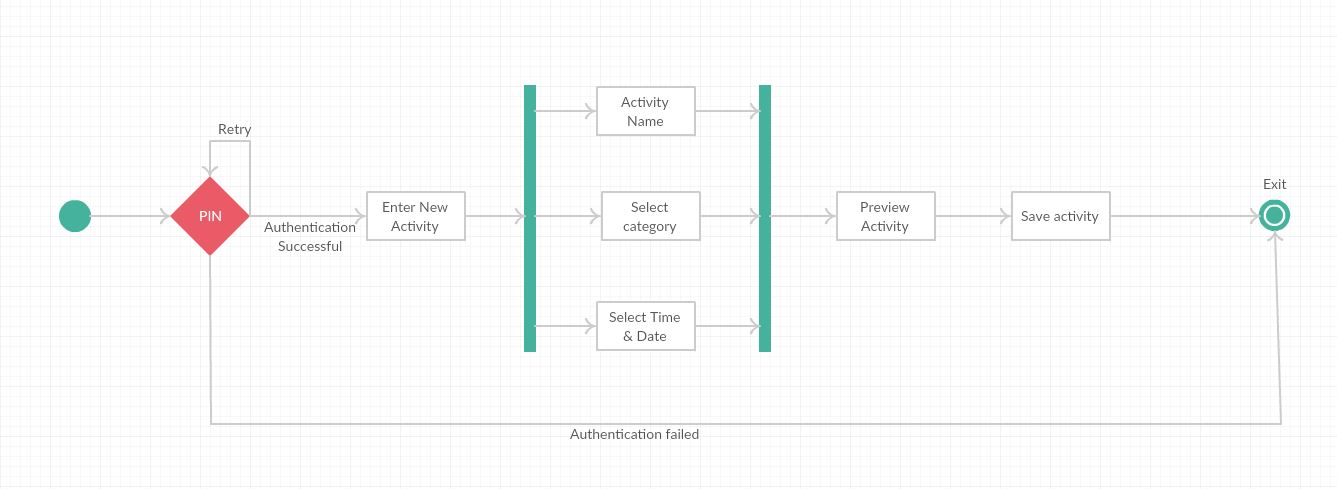 In this diagram it shows that the user is authenticated after the valid pin or else he is given an option to retry or to exit the app.
when the user enters the valid pin he is directed to home screen whe the user can choose the enter new activity option. Then the user have the freedom to select the category after entering the activity name and the user can set the duration of the activity and then the activity is saved in the database and exited ti the homescreen.
In this diagram it shows that the user is authenticated after the valid pin or else he is given an option to retry or to exit the app.
when the user enters the valid pin he is directed to home screen whe the user can choose the enter new activity option. Then the user have the freedom to select the category after entering the activity name and the user can set the duration of the activity and then the activity is saved in the database and exited ti the homescreen.
State chart for reviewing the history of activity
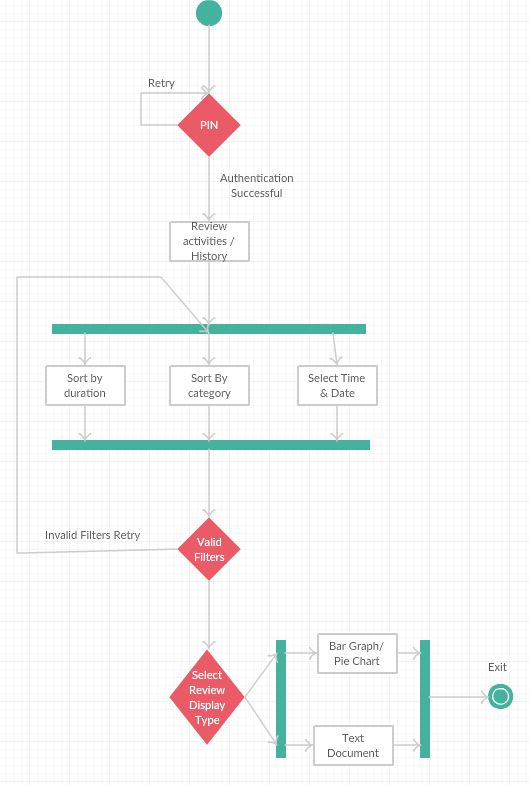
In the below diagram it demonstrates the activity overview or the history. In this feature the user selects to review his hostory of activities and then the user have the freedom to select the activites which he want to view by filtering according to type of activity or category or month. Once is user is done with selction of his preferences then the user is given an option to view the data in either format of text or a barchart representation which is much easier to understand.
Sequence diagram
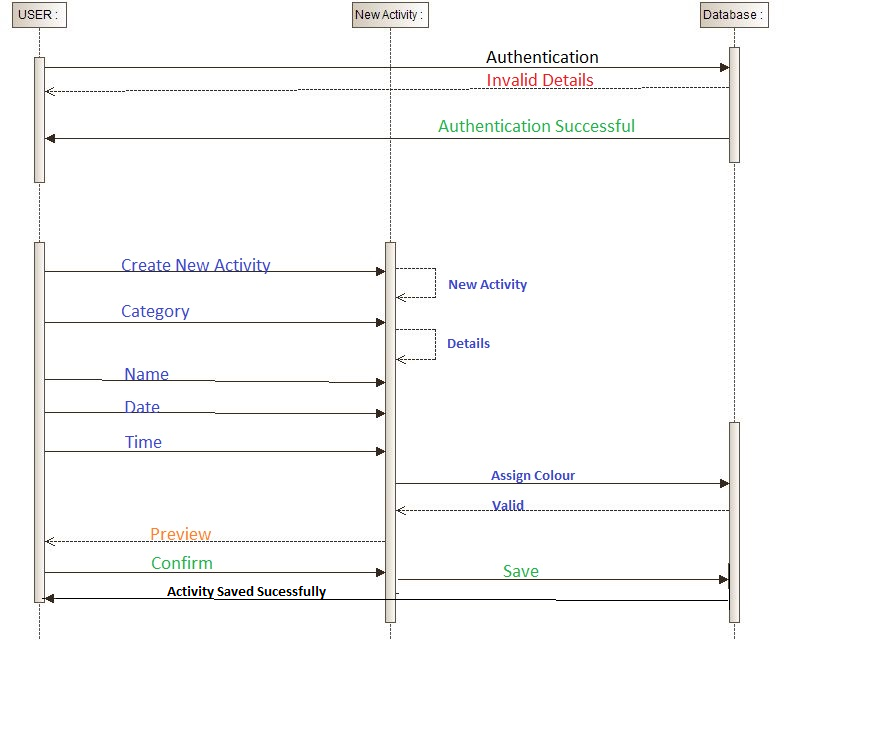
The below sequence diagram show the interaction of the app with the user in a step by step clear process for entering a new activity.
•the user authenticates with a valid pin and it is checked across the database and a reply mesage is sent back from the database wheter the authentication is successfull or not.
•Now the user enter a new activity by selcting a activity name its category, date of the activity, time of the activity.
• when the user submits the data the app assingns a valid colour and send the preview to the user.
• the user can confirm the data then the activity data is stored in the database.
•When the datat is saved successfully the reply message is sent to the user saying so.
Class Diagram
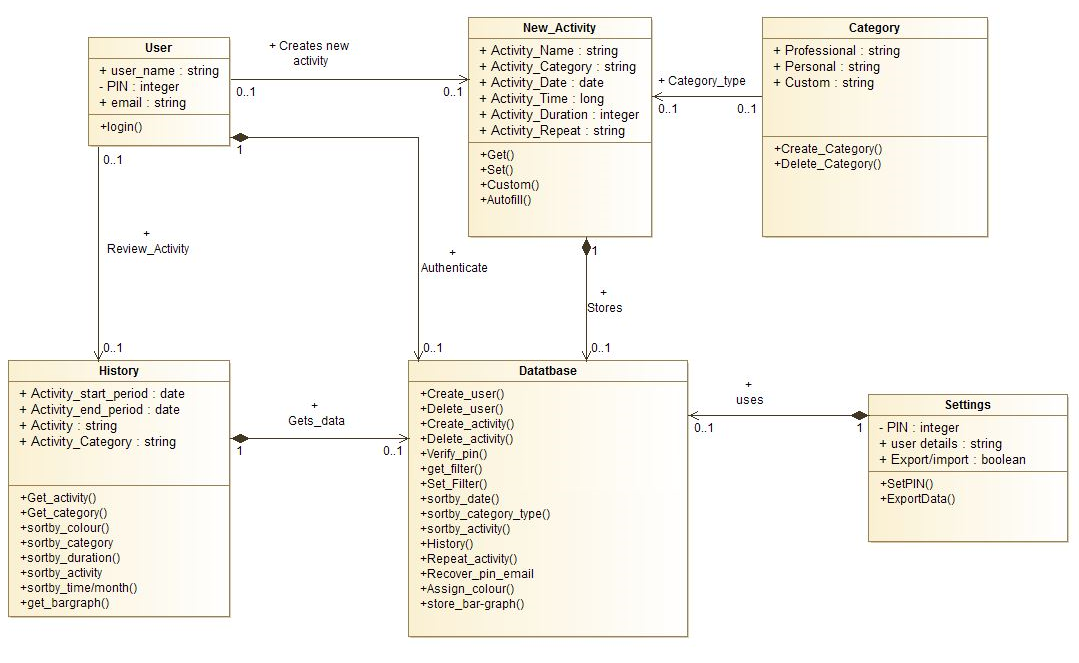 We have mapped our class diagram based on our use case scenario. We have identified the user, new activity, history, database, settings as our main classes.Here is the detailed description of each class their attributes, operation and association of classes as well.
User class
The user class consists of user name, PIN, email as the attributes which are essential for accessing the app although these can be disabled in the setting menu but more on that later. And the operation of the user class is to login which is done by verifying the pin through the database.
New activity class
The function of the new activity class is to enable the user to create a new activity and the attributes and the operations of the new activity class are as follows
•Activity name : It stores the name of the activty, data type is string.
•Activity category : It stores the type of activity which is acessed from category class, data type string.
•Activity date : It stores the date of the activity , datat type date.
•Activity time : It stores the user set time of the activity, datat type is long.
•Activity duration : It stores the duration of acctivity is carried out, data type isinteger.
•Activity repeat: It stores the repeated activities for autofilling, Data type is string.
New activity class operations
•Get() : Gets all the valid data from the user for relavant attributes.
•Set() : Creates all the necessary attributes in the database.
•Custom() : Sets the custom category if required by the user.
•Autofill() : It autofiils the newactivity if the same activity is being repeated.
Category class
Category class shares the association with the new activity class as this class only purpose is to provide user with different categories. They are classified as professional and personal. They are to store the category as either professional or personal. But if the user choose to go for another category the custom attribute store that new category. The operations of the category class are to create and delete categories.
Database class
The operations of the database class are as follows,
•Create user : To create new user details in the datatbase.
•Delete user : To delete user details from the datatbase.
•Create activity : To create a a new activity entry in the datatbase for further accessing.
•Delete activity : To delete any existing activity.
•Verify PIN : To verify the PIN from datatbase when user tries to login.
•Get filter : To get the filter parameters from the user.
•Set filter : To set the filter parameters in the database.
•Sortby date : To acess the activities based on the date.
•Sortby category : To acess the activities based on category.
•Sortby activity : to acess the activity based on the activityname/type.
•History : To display overview of the activites when user requested.
•Repeat activity : To provide the function of autofilling when activity is repeated.
•Recover pin email : Used to send an email when requested for PIN recovery.
•Assingn colour : To assingn a colour based on type of category selected.
•Store bargraph : To save all data as bar graph for further reviewing.
Settings class
The attributes of the setting class are
•PIN : Stores the PIN set by user
•User details : Stores the user information.
•Export/Import data : Stores the data required for exporting and importing.
The operations of the settings class are
•SetPIN : To set or edit PIN.
•Export/Import data : To export or import data via email or to another android device.
•SetUserdetails : To edit the user details.
History class
History class attributes
•Activity start period : Stores the start pediod set by the user for overview.
•Activity end period : StoreS the activity end period set by the user for overvies.
•Activity : Stores the activity selected by the user for overview
•Activity Category : Store the activity category for overview.
History class operations
•Get activity : Get the activity name from user
•Get category : get activity category from user
•Sortby colour : To sort and display by activity colour
•Sortby category : To sort and display by activity category
•sortby duration : To sort by duration of activity.
•sortby activity : To sort by activity type/name
•sortby month : To sort by month
•Get bar graph : To get bar graph for displaying activity overview from database.
Design Pattern
We are planning to use the facade design process also know as Structural Design Pattern.
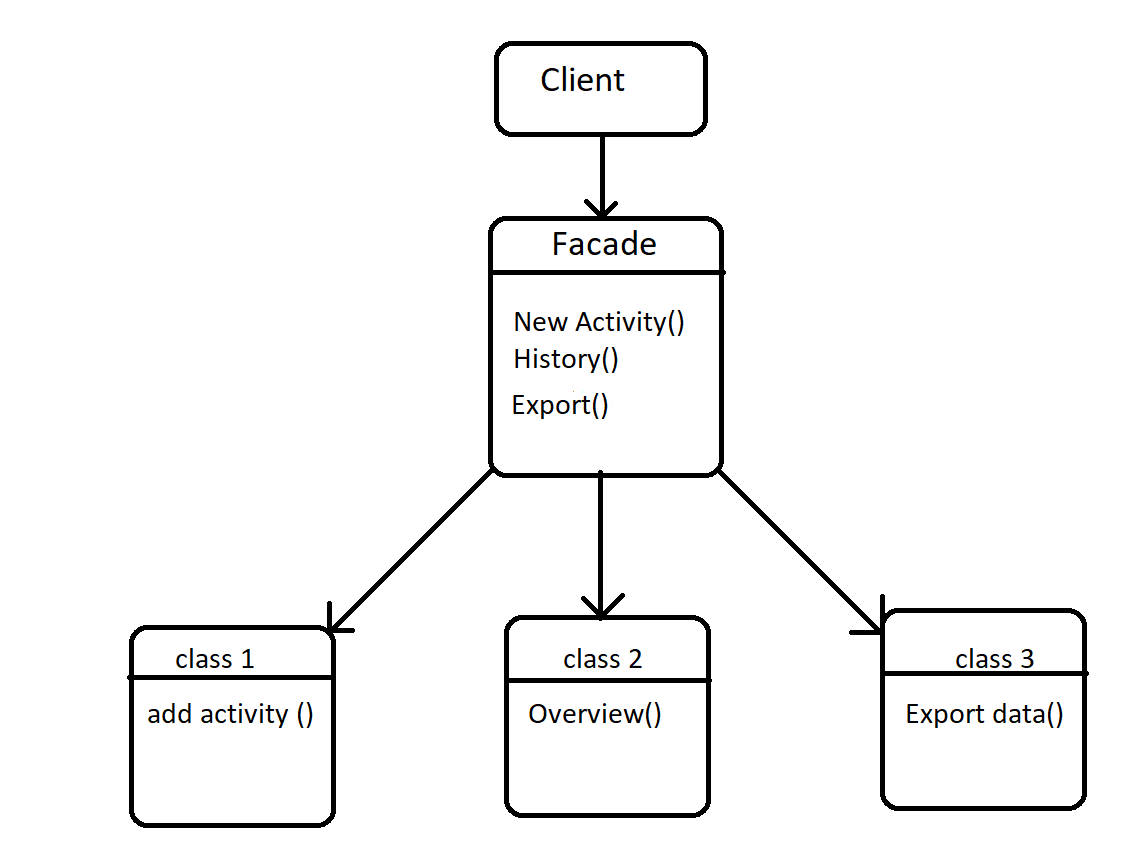 We choose this pattern because it hides the complexity of the code by providing an easy interface to the user that can access the whole system. A single class provides all the methods required by the user from the system. We choose this pattern after carefully studying it from the examples from the blog androidexample1 it was our refernce for the design pattern as we are new to the design patterns.
Development Strategy
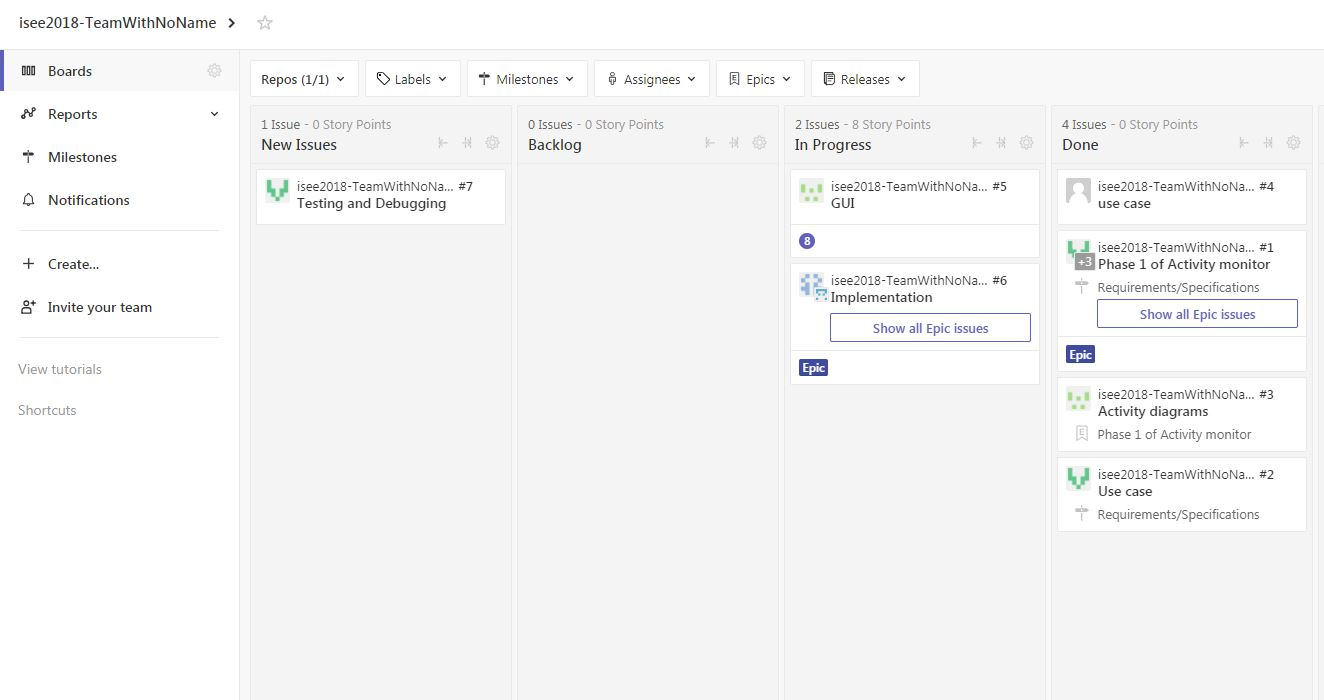
We are failed to use efficently the zenhub as this project main objective is to teach how to operate in gropu while working in an agile environment. But as for the rest of the development of this app we have decided to use the zenhub as efficently as possible.
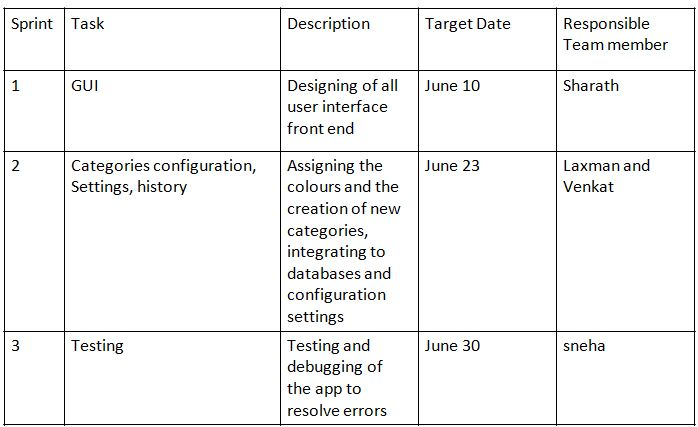
below is the plan for our next 3 sprints and a screen shot for the zenhub dashboard showing our strategy and deadlines for the tasks.
Summary of changes
As of now there are no major changes in the app functionality or customer requiremnts. the only notable feature is the user no longer have the freedom to set the colour the app automatically assing the colour for each category and same colour is assinged to a new activity if it is repeated.
tags: