Any milestone is one lesser than the final one, or probably one nearer to the latter. Team DroidSutra welcomes you back to our blog as we step a tiny tad closer to our final release. By the end of our 4th Sprint, the four of us came to this conclusion (call it, lame) that checking out birds and tracking them via an app is no joke. Heavy sigh. However, on a happier note, a major chunk of our application is ready to be launched as our Advanced Prototype. Please read through to know the progress we have made and the hurdles we have crossed to finally deliver the prototype and well, this blog for that matter.
This blog entry has the following sections.
… 1. Design Pattern
… 2. Implementation and User Interface
… 2.1. Coding Conventions
… 2.1.1. Code Review Cycle
… 2.1.2. Code Review Status
… 2.2. Specify Context of Use
… 2.3. Design Solution
… 3. Summary of Changes
1. Design Pattern
We are developing our application following Model View Controller (MVC), the most widely used Design pattern in Android.
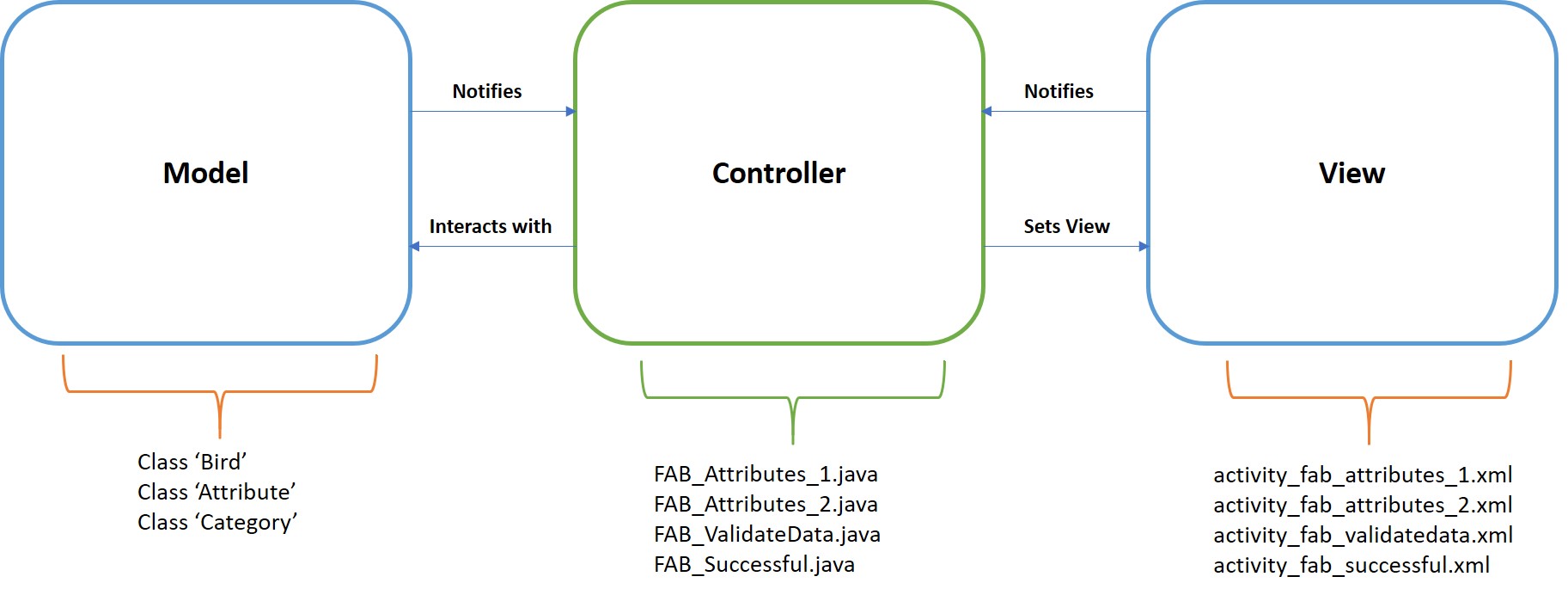
… Model - Data of the application. Realized as Classes
… View - Renders the User Interface. Realized as Layout (*.xml files)
… Controller - Links model and view. Realized as Activity (*.java files)
Essentially this pattern separates Model and View from each other. This helps the Model or the Data of our application to stand independent of the changes made in View. View contains information of the layouts used to develop the user interface. These .xml files do not influence the model as they are merely the representation of the model. The controller holds the logic to interconnect the model with the view. They are realized as activities in the application. The controller is notified by both the View and the Model. It, in turn, sets the view and operates on the data.
The following figure describes how we have made use of MVC pattern in designing our first major epic ‘Found A Bird’.
Though MVC has many disadvantages as compared with the other alternatives that have emerged over the years, we decided to use it as it is easily comprehensible. Android Studio inherently gives the basis for MVC and only logical segregation of application components to Model and View is required. Also, since MVC forms basis for all its alternatives we can extend the design approach to others in the further stages if the demand is compelling.
2. Implementation and User Interface
2.1. Coding Conventions
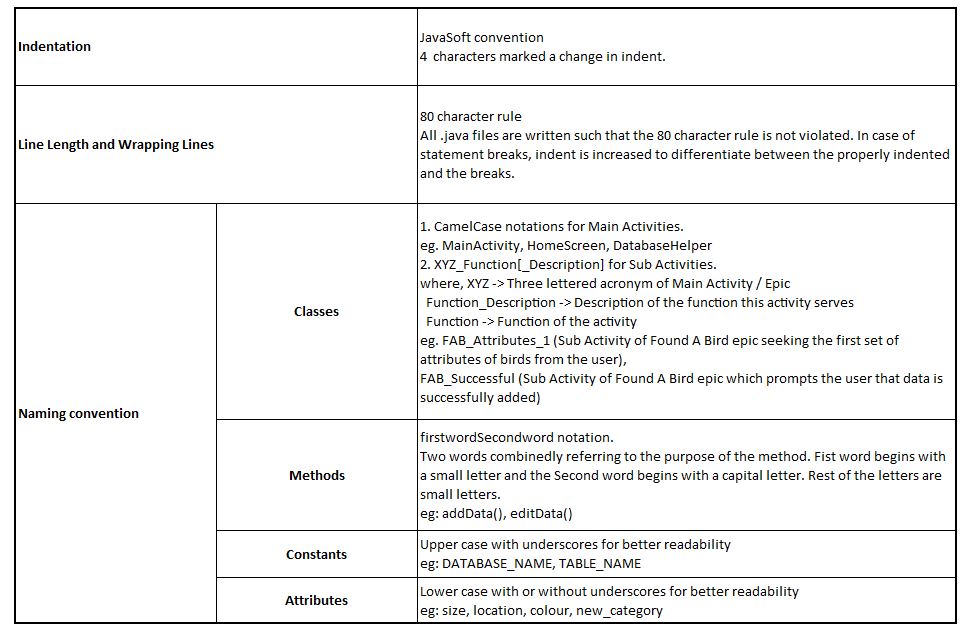
As most of us were new to Java programming, the conventions we used while coding was a mix. It had both JavaSoft conventions and our own conventions.

2.1.1. Code Review Cycle
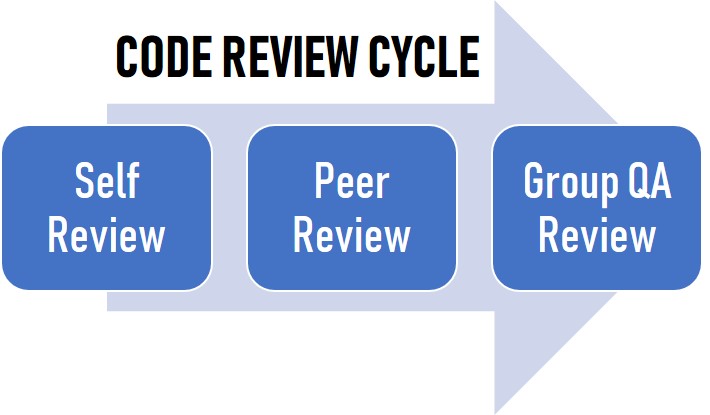
Enforcing adherence to coding guidelines was (or rather, is) a difficult task. As a developer each of us try to code in adherence to the guideline and perform an exhaustive Self Review before committing the same. This piece of code is then sent for Peer Review which one of our peers try to manually review and suggest corrections. Later, a group QA review is performed before the time of milestone releases. This final review shall help us identify the code which does not adhere to coding guidelines which leaked from Self and Peer Reviews.
2.1.2. Code Review Status
We are trying our best to adhere to the guidelines but however there are pitfalls which we positively believe to sort on the course of the project. Current Status of code reviews is as follows:

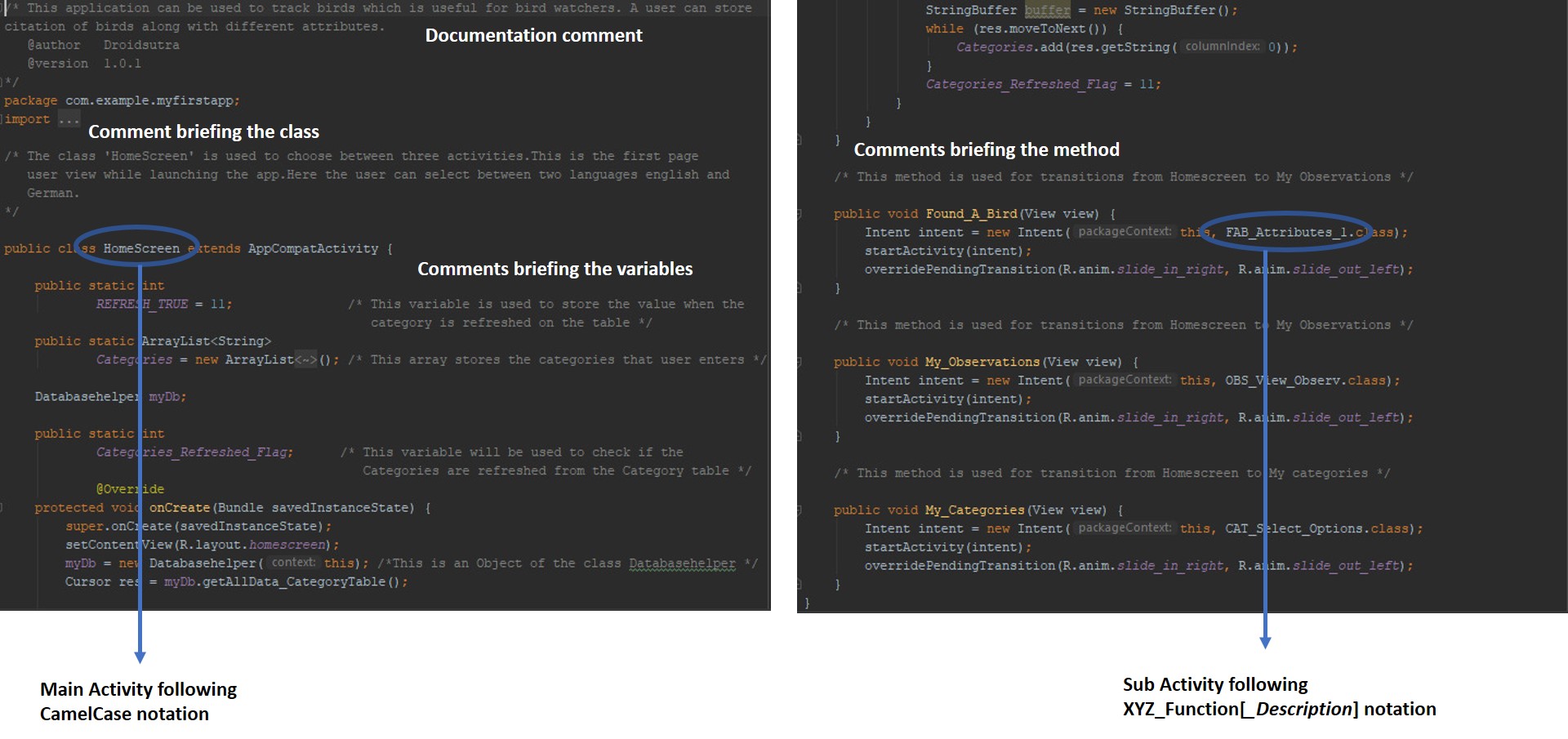
The below screenshot from ‘HomeScreen’ activity elaborates on the coding conventions we adhere to.
2.2. Specify Context of Use
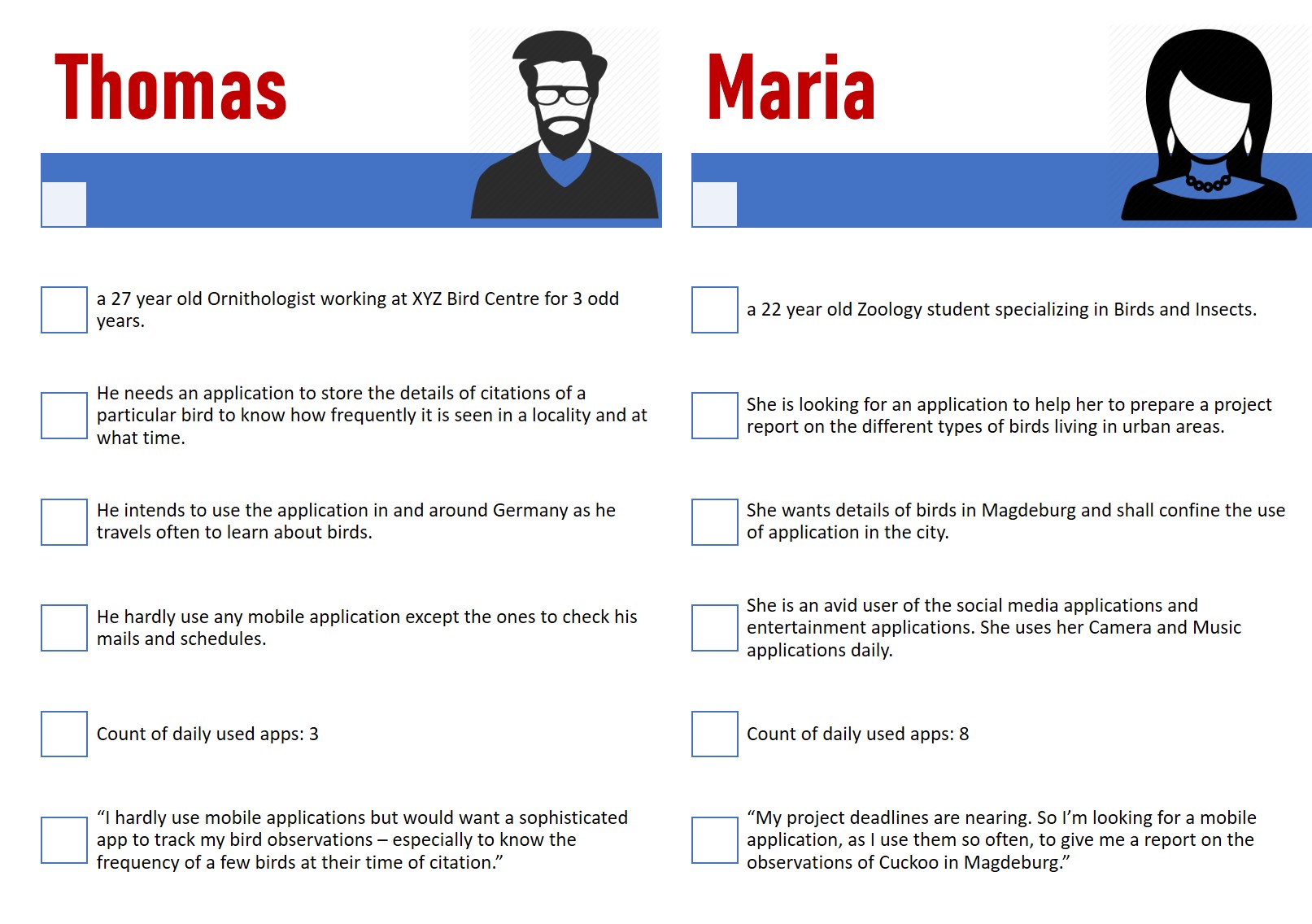
To specify the context of use, we met two potential users - Thomas and Maria and asked them questions which could help us identify their personal and professional backgrounds as well as their expectations from the application.
The following graphic compares and contrasts them as two Personas. Thomas belongs to our Expert User Persona while Maria belongs to our Beginner User Persona.
2.3. Design Solution
Having the context of use specified, the next task was to arrive at a reasonable design solution for our epics. We have made it a point to keep the design simple. However, we wanted the application to have more Image Buttons and Icons to communicate graphically and efficiently with the user. The design was shown to the Customer and feedback were sought.
We have made use of the following components while designing the activities.
As Input Controls, we have used the following:
… Text fields wherever the user has to enter an input string. For eg: Entering name of the category to be added.
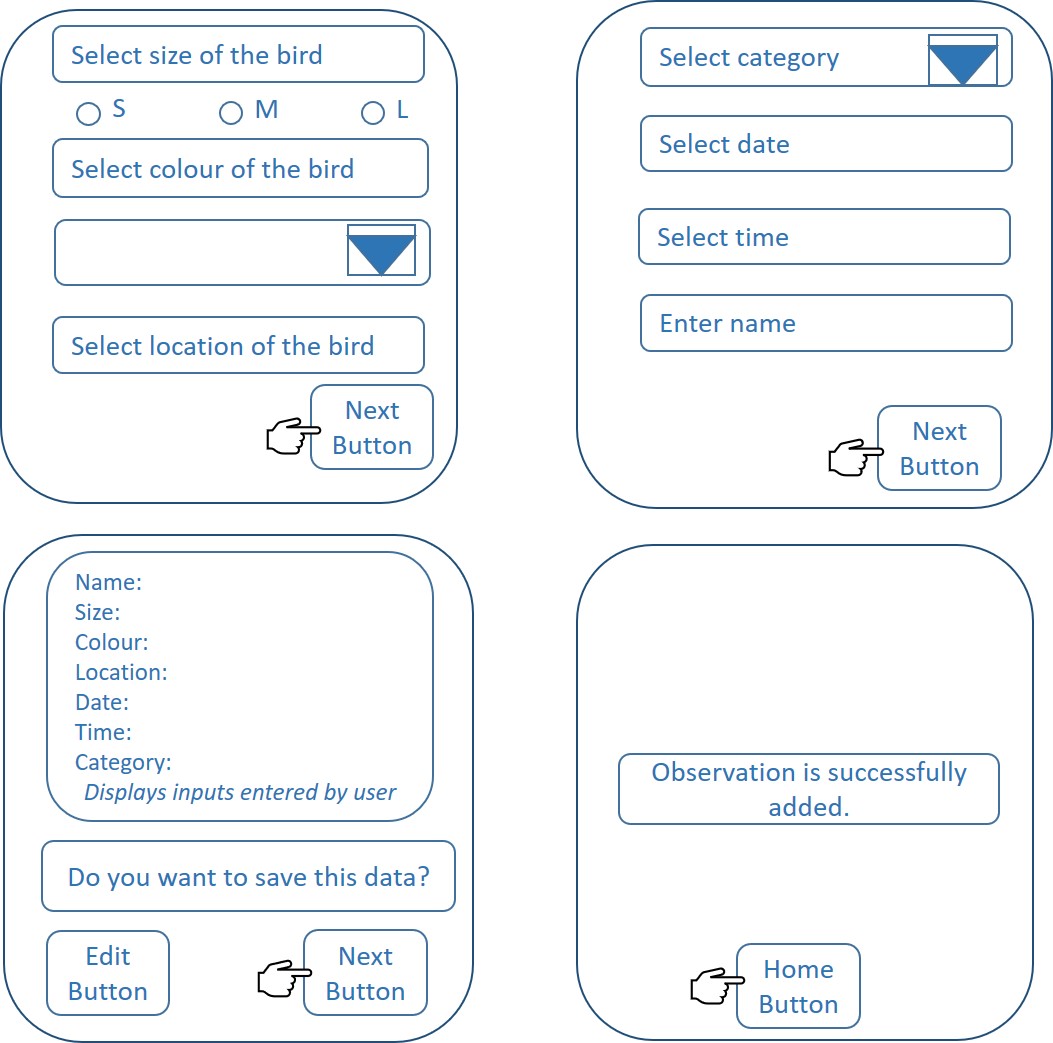
… Date and Time pickers to let the user pick and input date and time of citation of bird.
… Radio Buttons to let the user select size of the bird from S, M or L.
… Dropdown Lists to let the user select colour of the bird, category of the bird, etc.
As Navigational Components, we have used:
… Icons to help the user select if to add, modify or delete categories. Icons are also used just to give a graphic representation of the Text View against it.
As Information Components, we have used:
… Message boxes to give the user information about the different categories.
… Toasts to give the user the status of an operation (eg: Inserting observation to the Observations Table) or a warning (eg: Only if mandatory fields are entered, the user is allowed to go to the next activity)
In line with the Colour theory, we have used light green and light blue as our activity background to retain the sense of calmness and professionalism.
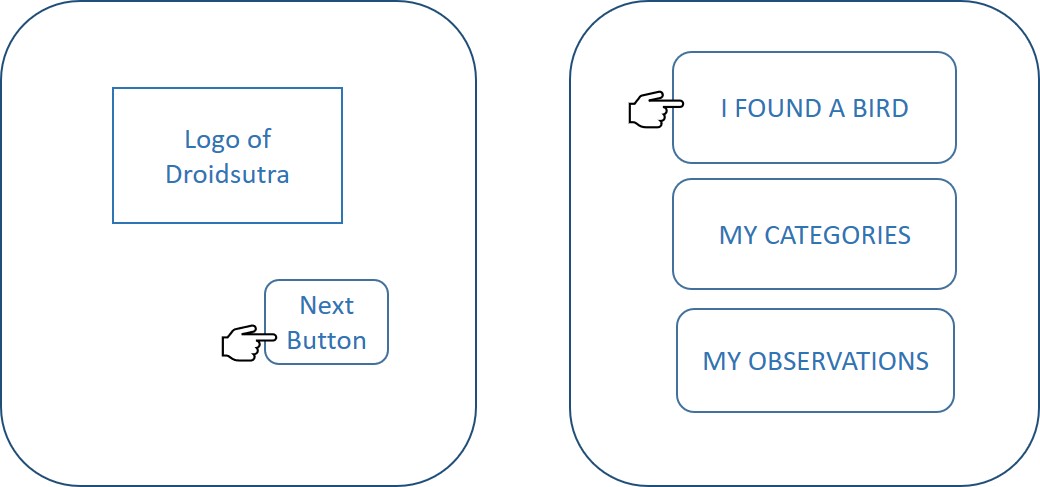
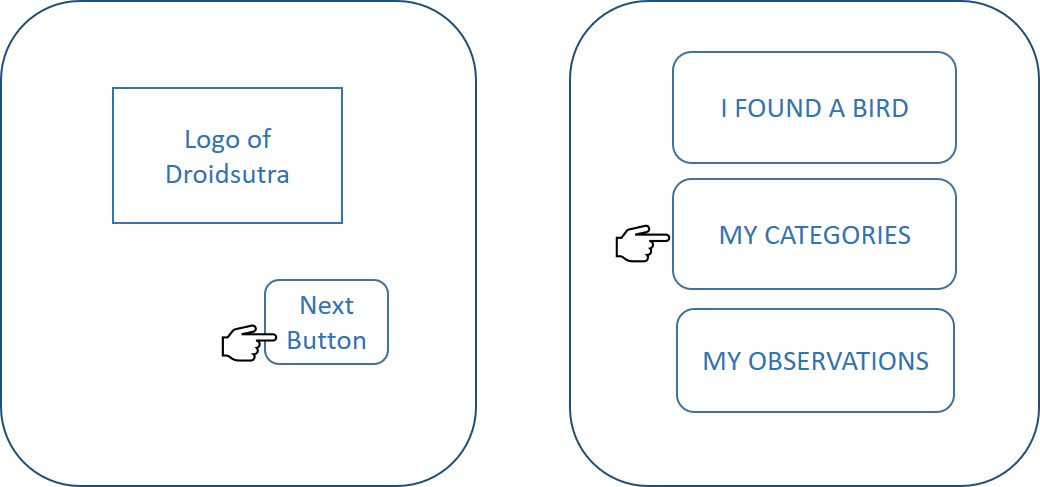
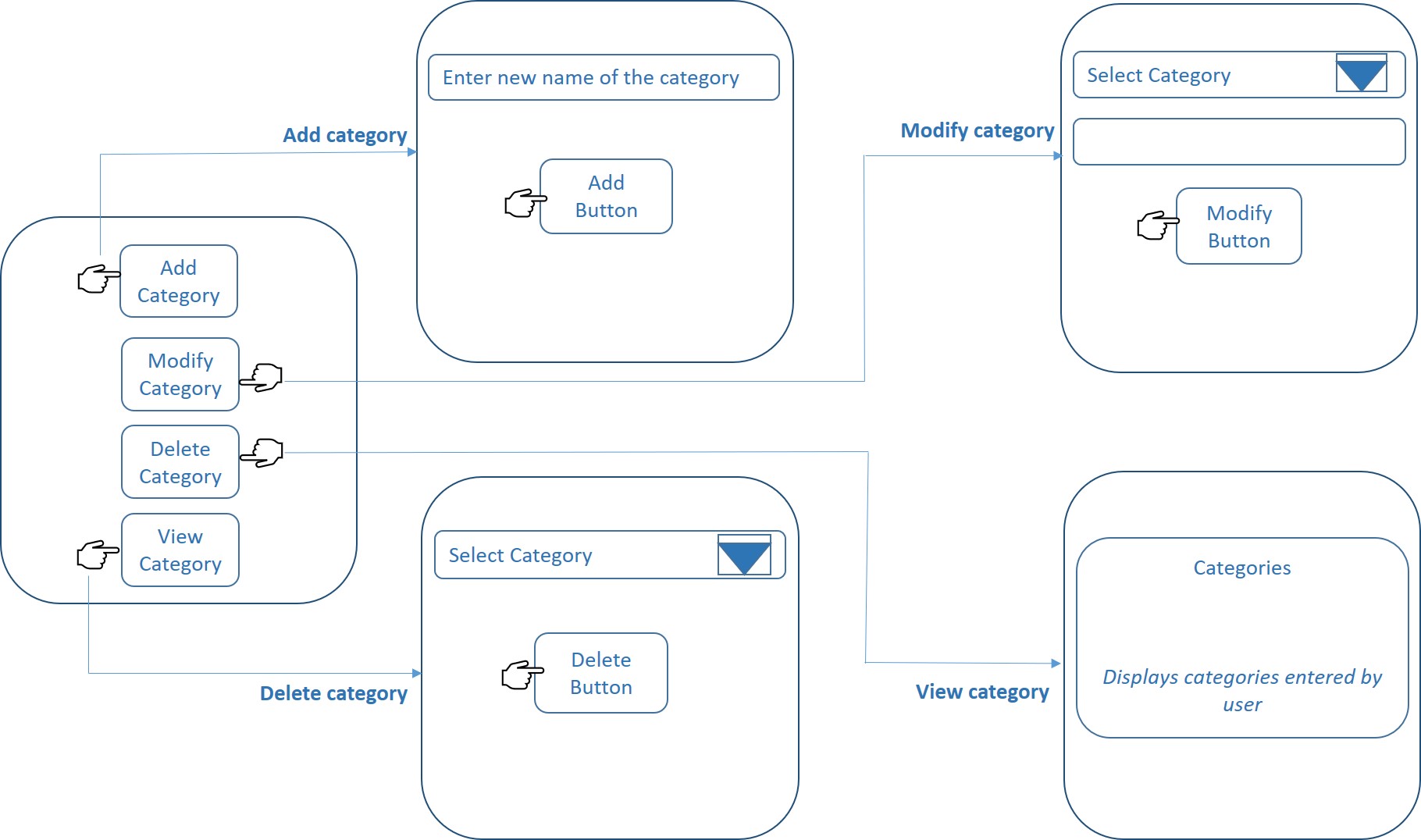
The above discussion helped us arrive at Design solutions for our two major epics - Found a Bird and My Categories, as shown below.
Design Solution for the Epic Found a Bird
Design Solution for the Epic My Categories
3. Summary of Changes
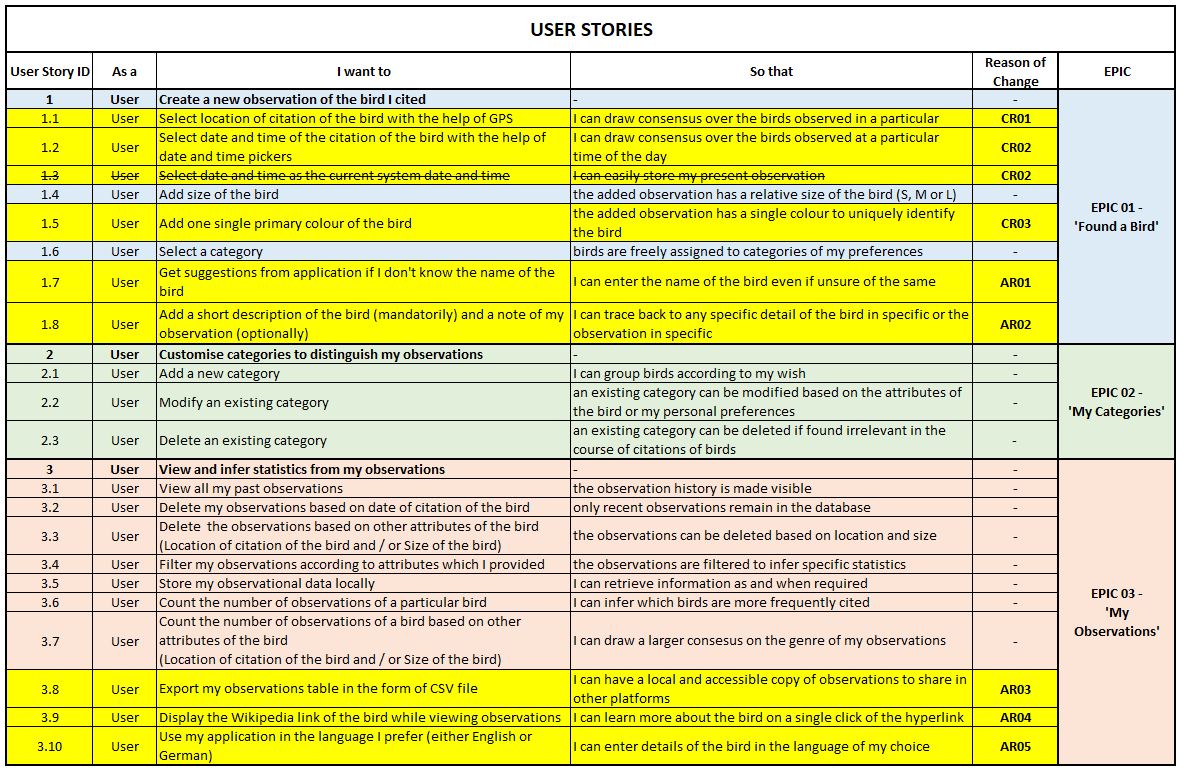
This section describes what we have done after our Basic Prototype Release and explains the impact of changes on our User Stories and Class Diagram.
We have successfully accomplished the following, after the previous milestone:
… Backlog of the previous sprint Sprint 03 is realized - Categories in ‘Found a Bird’ activity.
… Implementation of Epic 02 ‘My Categories’ is completed - inline with the Sprint Planning. (Tap on the shoulder!)
… Implementation of Epic 03 ‘My Observations’ is completed - ahead of the Sprint Planning. (Harder tap on the shoulder!)
However, there were a couple of requirements which we had to change and of course, add as per the customer demand.
Changed Requirements (CR):
CR01. Entering location of citation of the bird was changed from manual text input to fetching the location from GPS.
CR02. Entering date and time of citation of the bird was changed from manual text input to fetching both via Date and Time pickers.
CR03. Instead of prompting user to select three prominent colours of the bird, the app now prompts him / her to select only one single colour.
All CRs are implemented as part of Advanced Prototype.
Added Requirements (AR):
AR01. Suggestions for names of the bird from database. As the user starts to enter the name of the bird, a drop down appears listing common bird names and bird names already entered by the user in the previous observations.
AR02. The user should be provided with a description and notes field to populate his / her specific detail of the bird or the observation in general. Furthermore, description field is mandatory and notes field is optional.
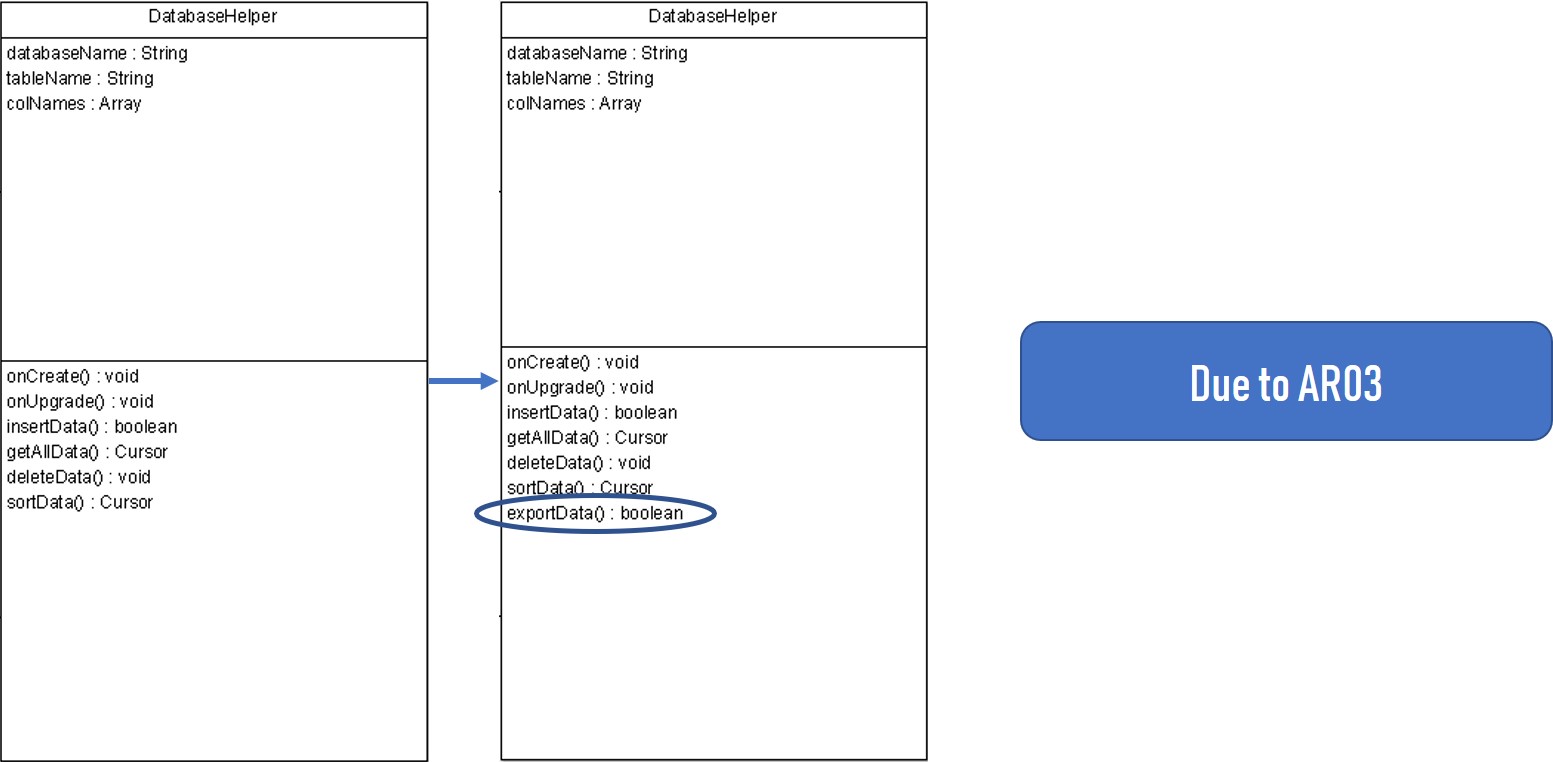
AR03. Exporting observations table in CSV format.
AR04. While viewing observations of birds, a Wikipedia link corresponding to the bird should be displayed along with.
AR05. Multi language support throughout the application. User can now choose either German or English to use the app.
AR01, AR03, AR04 are implemented. Rest of the ARs are backlogs from this Sprint.
These changes and additions have impacted our User Stories and Class Diagram, as detailed below:

That brings us to the launch of DroidSutra - the Bird Tracking App V1.0.1. Please find the release in the following link.
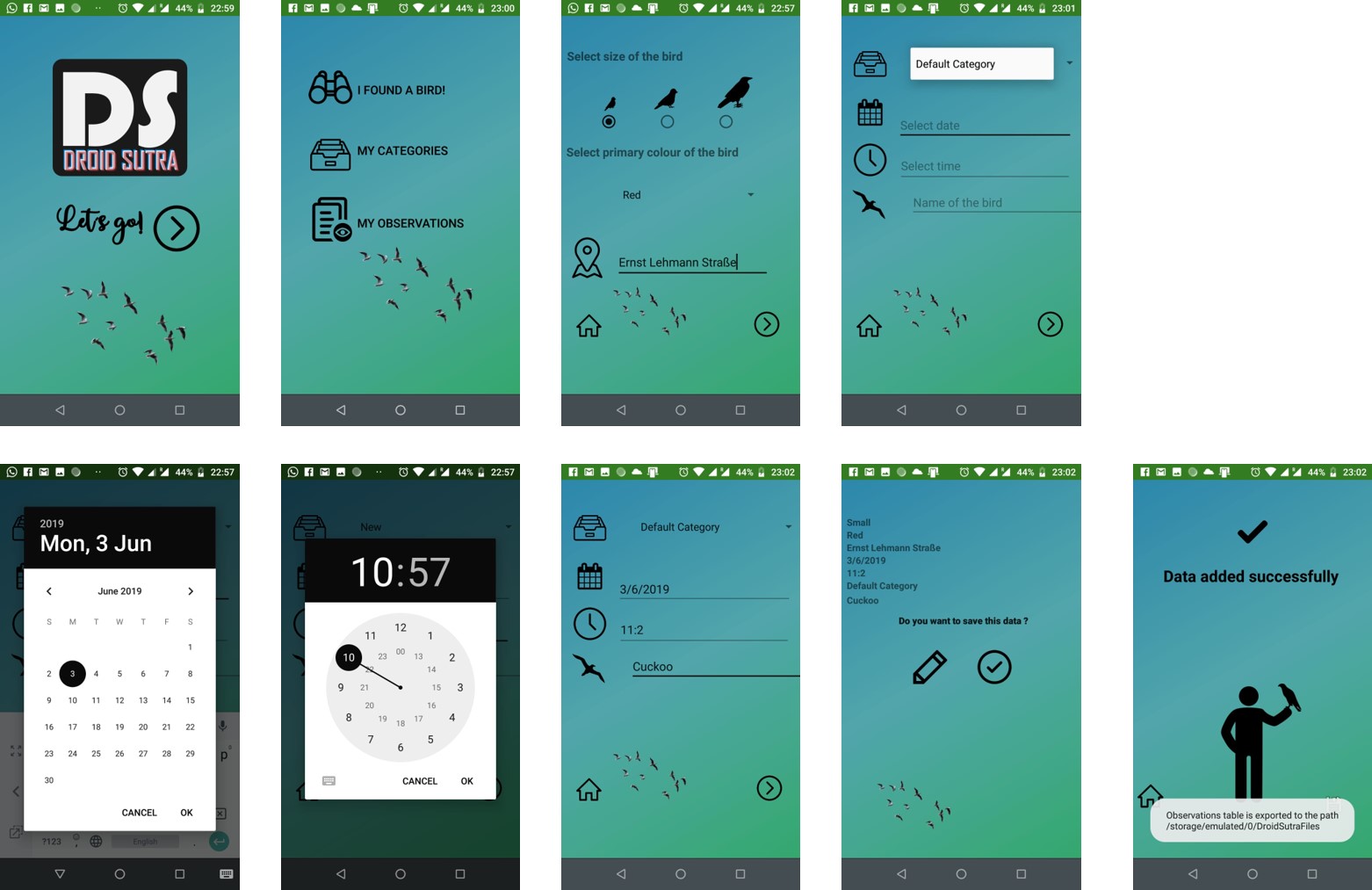
Here are the few screenshots from our Advanced Prototype.
EPIC 01 Found A Bird
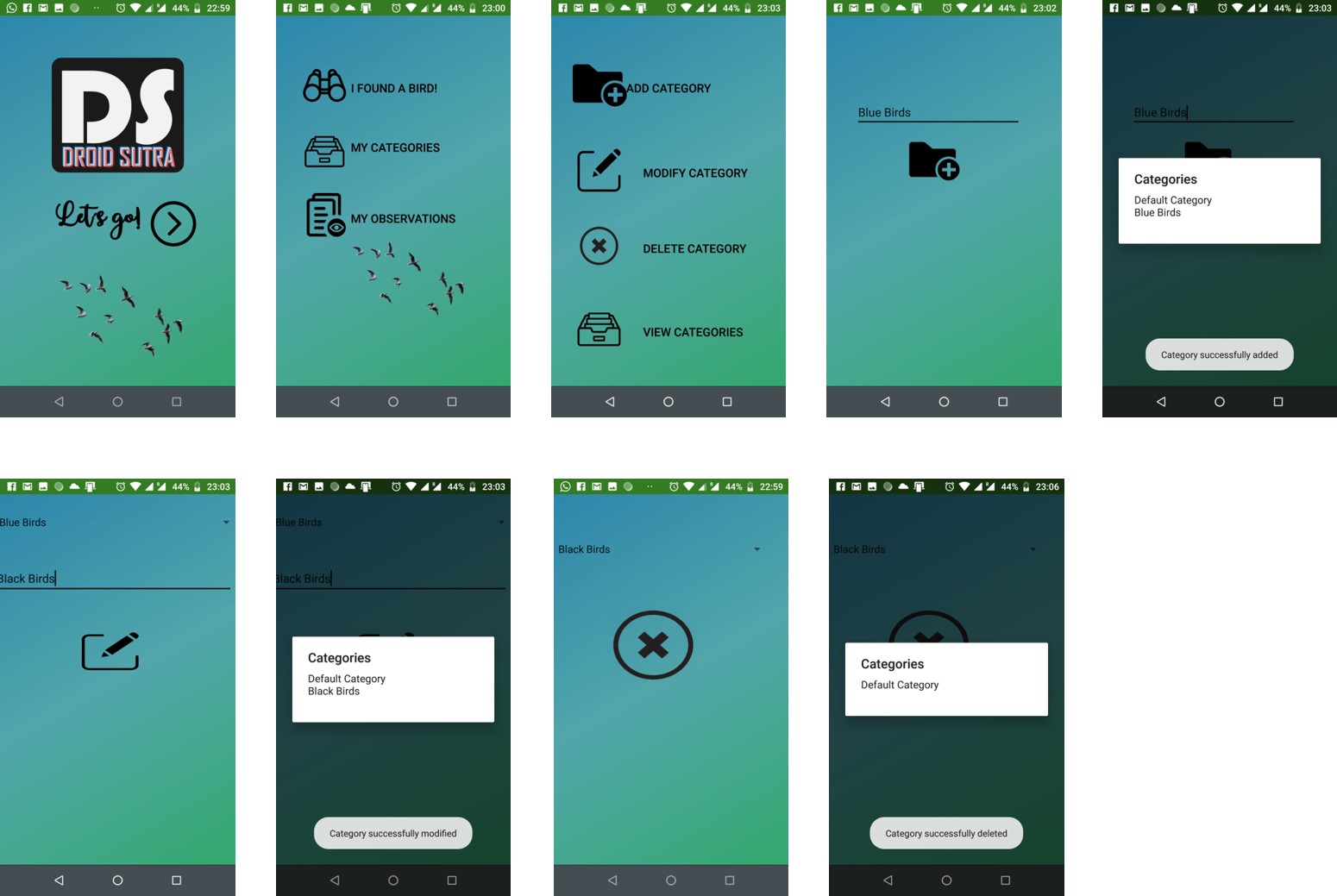
EPIC 02 My Categories
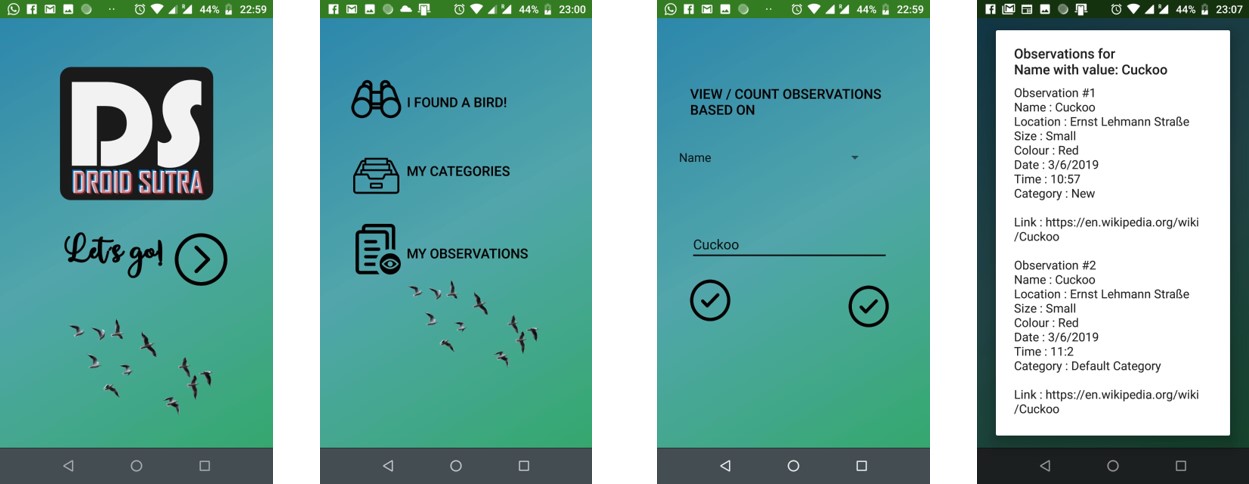
EPIC 03 My Observations
In another three weeks’ time we would have our Beta Protoype released (positively, indeed so positively!). Until then it’s time to part.
Mit freundlichen Grüßen,
– Team DroidSutra