Description
-
Design Pattern
Our system uses the MVC (Model View Controller) framework design pattern.
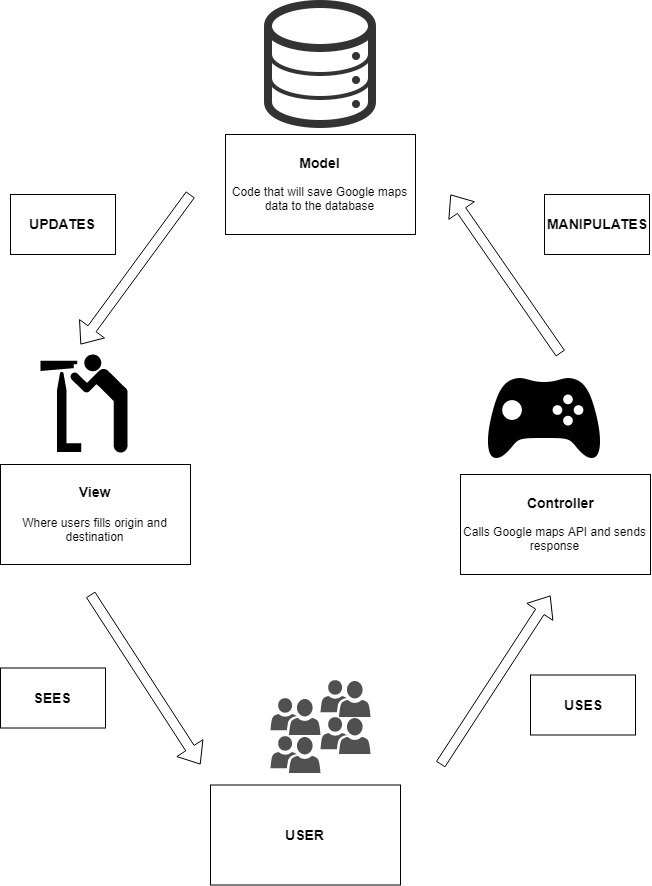 The Model View Controller separates the application into three main logical
components: the model, the view, and the controller. Each of these
components are built to handle specific development aspects of an
application.
The Model component takes care of all the data-related logic that the user
interacts with. This usually refers to all the data that is being
transferred between the View and Controller components, but it can also
include any other business logic-related data.
The View component corresponds to the UI logic of the application. For
example, the Start Journey view will include all the UI components such as
text boxes, dropdowns, etc. that the final user can interact with.
Controllers act as a bridge between Model and View components to process all
the business logic and incoming requests, manipulate data using the Model
component and interact with the Views to render the final output.
As our application needs frequent communication to get the users coordinates
as well as to keep users informed of all the position their friends we
believe MVC design pattern would be a good fit. We will get the data that
the user enters (source, destination) using the views and via the controller
we will get the data from Google Maps API and we can send this information
to our model to store it in database and then hand back the control to
controller for next task to compute. We believe it is a robust design
pattern that fits our needs.
The Model View Controller separates the application into three main logical
components: the model, the view, and the controller. Each of these
components are built to handle specific development aspects of an
application.
The Model component takes care of all the data-related logic that the user
interacts with. This usually refers to all the data that is being
transferred between the View and Controller components, but it can also
include any other business logic-related data.
The View component corresponds to the UI logic of the application. For
example, the Start Journey view will include all the UI components such as
text boxes, dropdowns, etc. that the final user can interact with.
Controllers act as a bridge between Model and View components to process all
the business logic and incoming requests, manipulate data using the Model
component and interact with the Views to render the final output.
As our application needs frequent communication to get the users coordinates
as well as to keep users informed of all the position their friends we
believe MVC design pattern would be a good fit. We will get the data that
the user enters (source, destination) using the views and via the controller
we will get the data from Google Maps API and we can send this information
to our model to store it in database and then hand back the control to
controller for next task to compute. We believe it is a robust design
pattern that fits our needs.
-

Coding Conventions
Coding conventions are important to have good and understandable code as well as to reduce stress in figuring out what someone else’s code does. Having this in mind for our backend we will be using the ES.5.1 specification and for our frontend we will be using the Draft java coding conventions. To make sure that we keep in line with the coding conventions that we set for our project in our system for tasks assignment in the review phase where at least one other team member will review the code, he/she will also check for any deviations from the coding conventions so that they can be corrected. For our Coding conventions we will be following the JavaSoft conventions:
- Class: Noun, first letter capitalized
- Method: starts with a verb, lower case
- Variables: descriptive names, lower case
- Constants: descriptive names, upper case
Internal Conventions:
- Using abbreviations for requests sent to our backend (example: request for position halfway point is req50info, for 25% of journey is req25info)
- Comments should be used however they can be maximum one line long, precise and concise
-
Who will use this application?
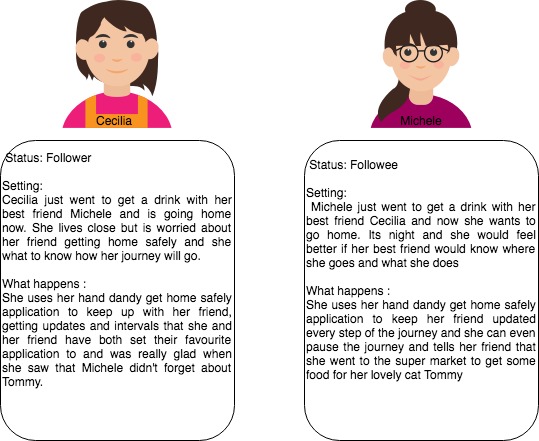
Our application can be used in a wide range of varied situation by pretty much anyone who wants to know if their friends and loved ones arrived safely home and had a good journey. We also considered that sometimes plans change and it should be easy to inform the people who care about your safety and well-being. To better illustrate how one would use our app we have a little example with two lovely ladies.
-
Summary of Changes
What we have to add:
- Addition of pause button – button that will pause the journey and the one who pauses it must send a short explanation to the group as wo why he is pausing the journey
- Notification about deviation from the path – should the followee deviate too much from the path the follower/s should receive a notification
- Abort button – a button whit which the journey can be canceled and the followee must give a short explanation, which the followers will receive as a notification
-
How the requirements of our new and demanding customer will cause changes:
The User Stories
-
I do not want to be followed anymore
- When users reach their destination, then the following steps and followers receive a notification. And users can also cancel the following at any point of the journey, then the followers will also get a notification with this cancellation.
-
I want to be updated on the status of the followee
- Users can specify if he wants to receive the update notification from the followee, or only when receive the notification that he has arrived his destination. Users need to specify whether he wants to give information to the followers during the journey.
-
I need a Panic button
- Users can select (when signing up this app) whoever he wants to have as emergency contacts. When he presses the panic button, these emergency contacts will be notified along with followers.
- Followers will be shown the lost position when the followee pressed the panic button. Moreover, the followers are be able to launch to a call or text to contact followee, or even can call the emergency secures.
-
I want to know if my friend is taking too long to get home or is not
moving for a while.
- Followers get a notification if followee hasn’t arrived home in the planned journey (Time > planned journey time + buffer time). Also, for the situation of the followee has not moved for 5 mins.
-
I want to follow more than one friend at the same time.
- Users can follow max. 10 persons at the same time.
-
I want to be able to pause my Journey (change color to red or
something to distinguish between new and old)
- Folowee should be able to pause the journey but also give a short explanation to the group as to why he is pausing the journey
-
I want to know if my friend/s have deviated from their path (change
color to red or something to distinguish between new and old)
- Should the followee deviate too much from the path the follower/s should receive a notification
-
I want to abort my journey at any time (change color to red or
something to distinguish between new and old)
- The user may abort the journey at any time, however he/she must give a short explanation, which the followers will receive as a notification
-
I do not want to be followed anymore
-
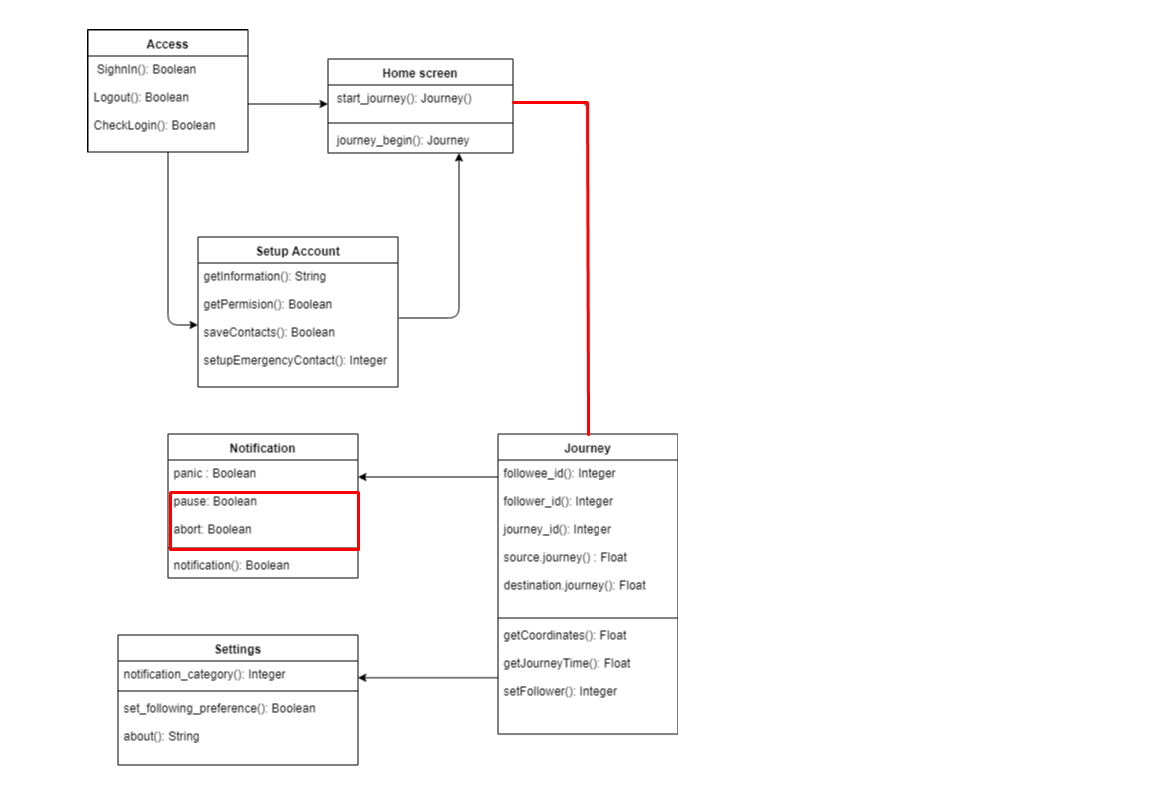
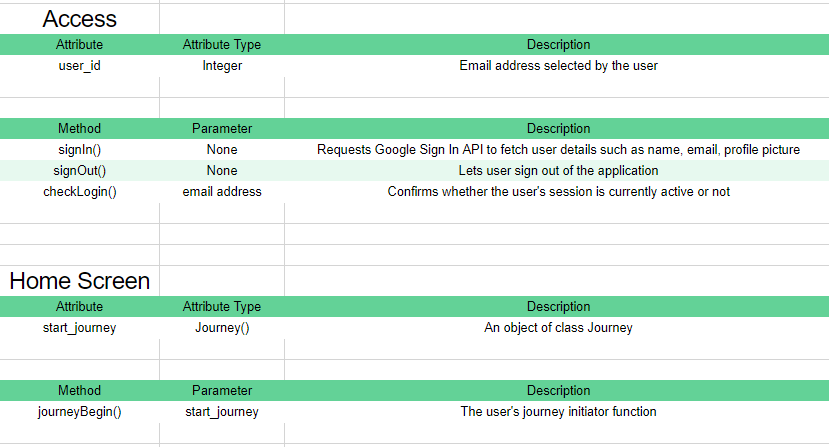
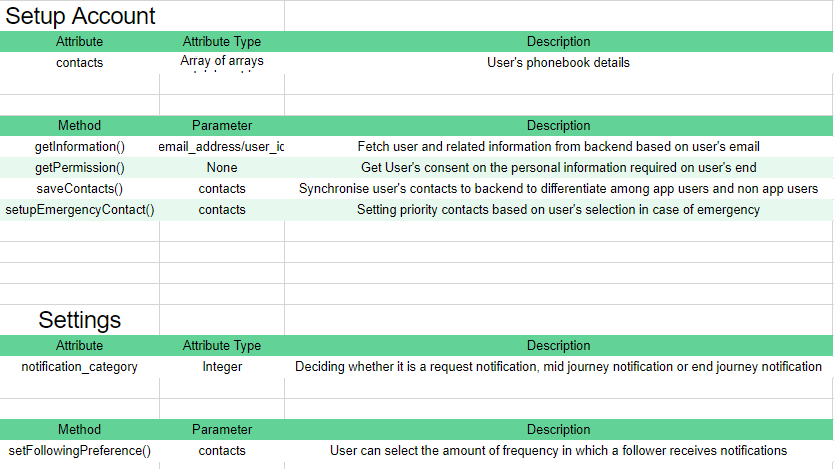
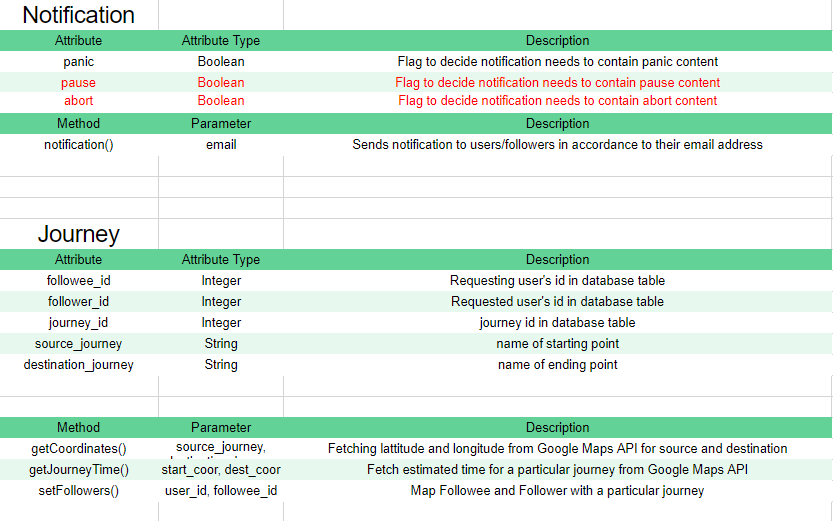
The Class Diagram
-
Our Design Principles are:
Usability and simplicity
We take inspiration from apple and their easy to use, understandable and straightforward design principles. We also focus on a more minimalistic style and avoid clutter. We strive to find the right amount of content per screen. We also favor a flatter look which underlines our design principles of simplicity and usability. We believe simple elegant and beautiful design is important and we strive to make our users feel comfortable while using our app. We strive to apply these same design principles in other aspects of our application
Future Layout Designs:
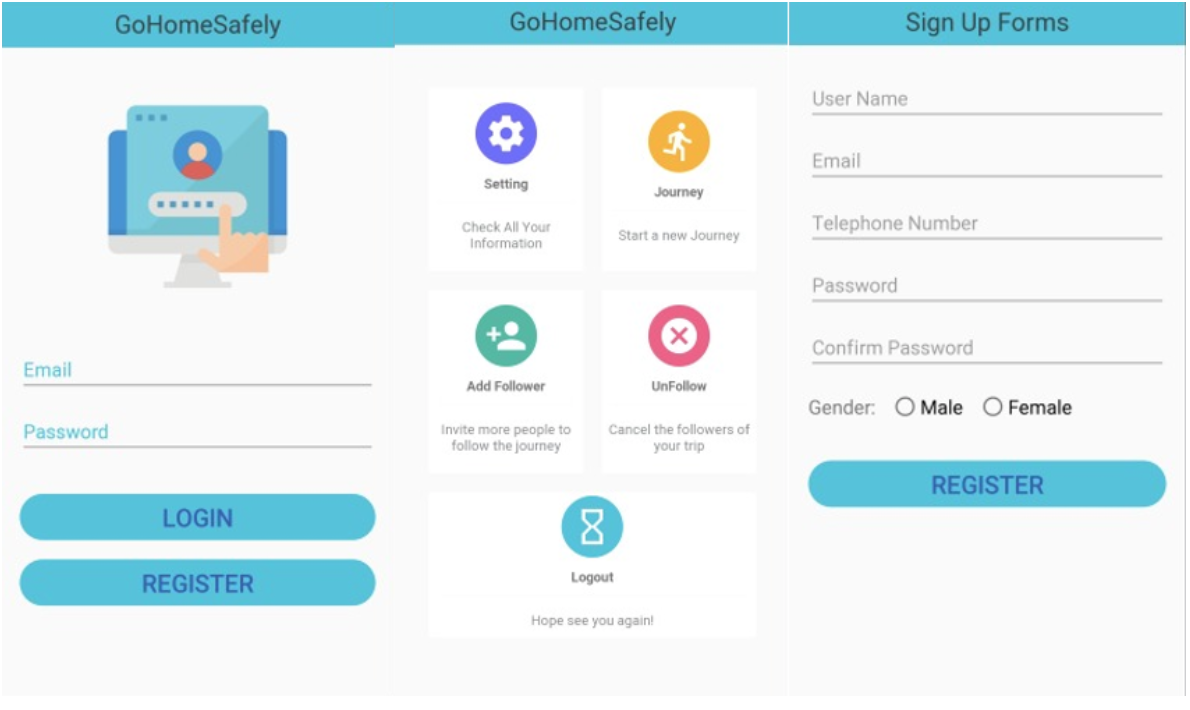
From the pictures you can see implementations of our design principles. Here we display our Log in screen which is simple, efficient and user friendly. We also have our Sigh up form if a user wishes to join. We can also see here that it is elegant and should not hassle potential users. Our homage Is a little more interesting having icons with various colors. These colors help distinguish the icons from each other, but they are still compatible with each other and the other design elements and the application as a whole.
Color scheme
For the selection of our color palette we opted to go for a nice bright(baby) blue to be the color of our theme (our central color- color for our accents). We additionally employ a nice beige grey to give the application a beautiful and interesting look. We selected blue because It is a colour that symbolizes loyalty, strength, wisdom and trust. Blue color is also known to have a calming effect on the psyche and as with our app we want our users to feel calm and peaceful while going to their destination.
Our Current Implentation:
NOTE: The functionality of Get Journey Data will not work as of now on any device because the Backend API is still a local API. It is still to be hosted on a Cloud Service.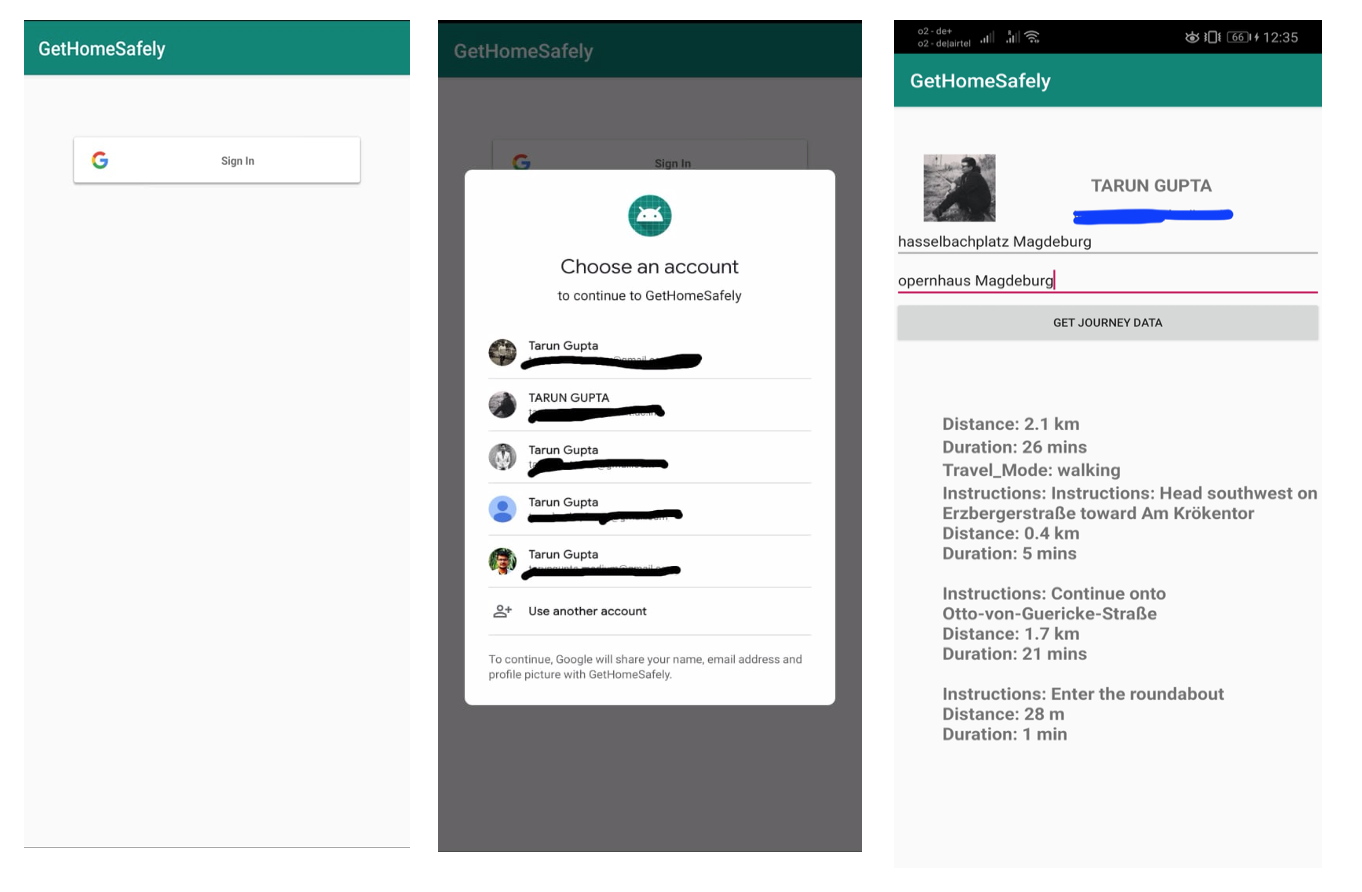
The data shown below the search fields is step by step description of how to reach from source to destination, how much is the distance and what time will it take to complete the journey. The data shown on top is retrieved from Google SignIn API.
Application APK Link Advanced Prototype
-
Design Solution / Storyboard
Even though not our final design we would like to provide a short storyboard for two of our user stories:
-
I want to be able to pause the journey
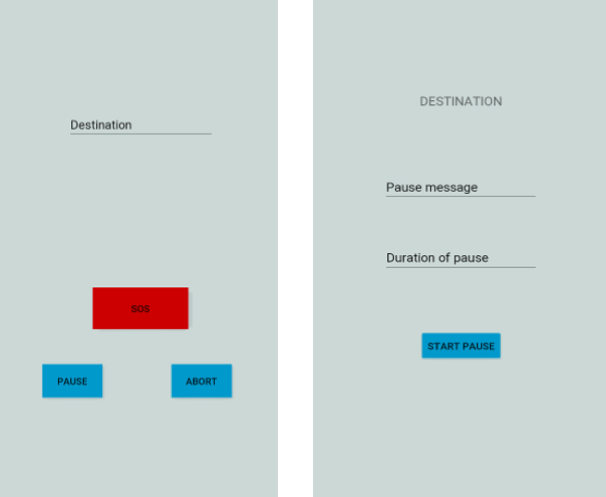
Here we can see by pressing the pause button we can then specify the message that our followers (in the pack) will receive as an explanation and we can also specify the duration of the pause.
-
I want to be able to abort my journey at any time
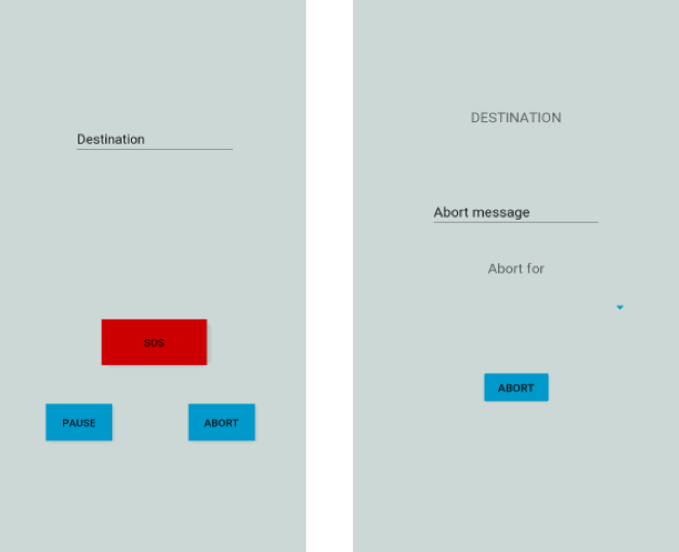
Here we can see by pressing the abort button we can then specify the message that our followers (in the pack) will receive as an explanation. However here we can also specify if we want to abort it for certain members of our pack or for all
-